SNACK three-line summary
- Google introduced Colab CLI on June 5, according to the original article.
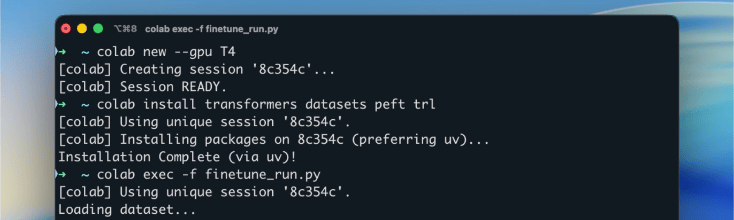
- The tool brings Colab runtime use into terminal workflows, including script execution, remote shells, logs, result downloads, and cleanup.
- Official support in the original article is Linux and macOS, while Windows is not supported; billable VM sessions also require cost awareness.
Media and reference clips
The media below follows the verified source assets used in this article.
Editor quick take
- Nea — This is not just a notebook feature; it changes how scripts and agents can request compute resources.
- Red — The convenience is strong, but billable sessions mean automation still needs shutdown and cost checks.
- Kirari🌟 — The agent angle matters because a workflow can call remote GPU or TPU resources without a person keeping a browser open.
The quick read
Colab CLI packages familiar Colab runtime access into command-line workflows. The original article highlights commands for running scripts, opening shells, checking logs, downloading outputs, and cleaning up sessions.
Why it is worth a look
For developers and AI-agent users, the shift is practical: a script can request a remote compute environment and retrieve results without manually working through a browser notebook.
Limits to check
The original article notes Linux and macOS support and Windows exclusion. It also emphasizes that sessions are billable VMs, so unattended automation should be handled carefully.
Editor view
The announcement makes Colab look less like only a teaching notebook and more like a command-line execution platform for automated AI work.
Quick reference
| Check | Details |
|---|---|
| Tool | Google Colab CLI |
| Commands noted | run, exec, repl, console, log, download |
| Use case | Terminal automation and AI-agent compute workflows |
| Limits | Linux/macOS support; Windows excluded in the original article; billable VM sessions |
Sources and check date · Game Sunakku English edition. Checked: June 6, 2026
Leave a comment