
SNACK: 3-line summary
- GitHub introduced an opt-in public preview of its new pull request Overview page on November 5.
- A compact summary brings merge status and next available actions to the top, with checks, comments and approvals close by.
- Join through “✨ Try the Overview page” in the header; you can switch back to the classic overview during the preview.
Long pull requests can leave the merge box buried beneath comments and timeline events. GitHub’s new Overview preview puts merge readiness and the next available actions at the top of the page, giving reviewers a place to start before diving into the discussion.
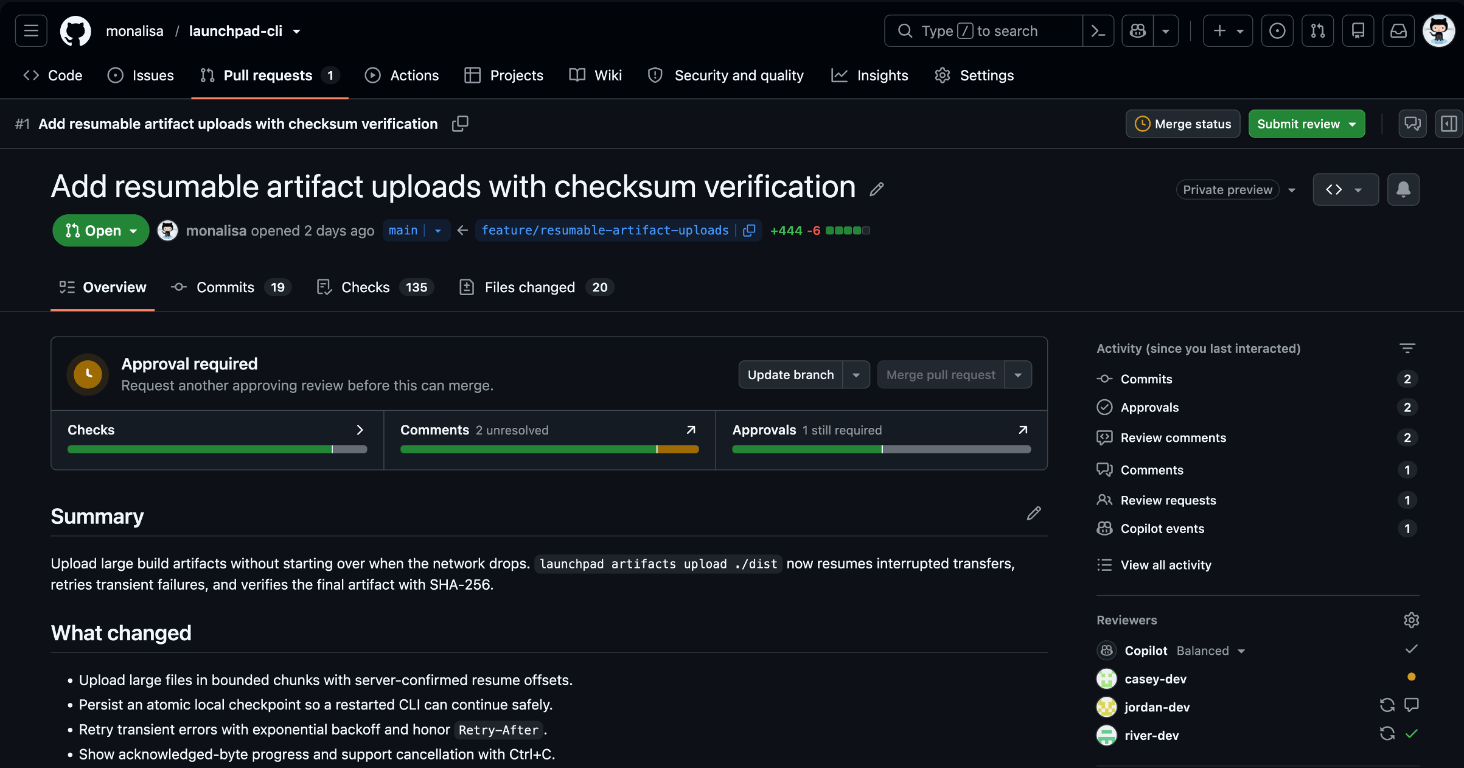
A smaller merge box with actions close by
GitHub says the redesigned merge box presents the same information in less than half the space. A compact view of checks, comments and approvals lets you find the detail relevant to your next step, whether that means opening a failing check, seeing whose approval is still needed or following a comment.
Available actions can help move the pull request forward, such as updating a branch. When the requirements are met, you can merge.
Snackgirls react
AIKO: I like a status display that comes with a next move. I want to see how clearly it separates a failing check from an approval that hasn’t arrived—those need very different responses.
Red: Newest-first comments are the bit I want to try. On a long review, I’d rather jump into the latest reply than scroll through the whole discussion to find where to pick up.
Find unresolved threads—or start with the latest reply
You can filter conversations to show unresolved discussions or comments you wrote, making it easier to find open questions and follow up on your own feedback. Comments can also be sorted newest first instead of starting with the earliest discussion.
An activity summary in the upper-right helps you catch up on review comments, review requests and other updates.
Try the preview and keep the classic view within reach
Select ✨ Try the Overview page in the pull request header to opt in. The header also offers actions to mark a draft ready for review or close a pull request, depending on your permissions.
GitHub describes this as an early step in reworking the pull request experience. If the classic overview still works better for a particular review, you can return to it through the same preview menu.
Sources and date: 2026-11-09
Comments
0No login needed. Edit or delete your comment from the same browser.
All comments 0
한국어 · English · 日本語No comments yet. Start the conversation.