SNACK Summary in 3 Lines
- A genuine Google recovery message was triggered through an attacker-controlled account
- The caller impersonated Google and used the legitimate alert to support the story
- Google says it never calls users about account security

Snackgirls react
AIKO — The message can be genuine while the caller borrows its credibility. A legitimate workflow proves that a workflow was triggered—not who is speaking on the phone.
Nea — I’d slow down and read which account the alert actually names before reacting to the caller’s story. That small detail can show whether the warning concerns your account or was only copied to a recovery address.
A genuine Google email did not make the person on the phone genuine. In a case published by Proton on September 4, 2026, an employee ended the call before the impersonator revealed the final request, so the exact ask remains unknown. Proton inferred that the sequence was intended to obtain some form of account access.
How the attacker triggered a real Google message
According to Proton, the attacker created an anonymous Gmail account and entered the target’s address as its recovery email. Google then sent the target a genuine request to verify that address, complete with authentic branding, sender details, and a code because a legitimate account-recovery workflow had been started.
A caller from a California number then claimed to represent Google and said someone had tried to change the recovery address on the employee’s Gmail account. During the call, the impersonator described a supposedly blocked access attempt and claimed to have intercepted an authenticator code.

The fine print pointed to a different account
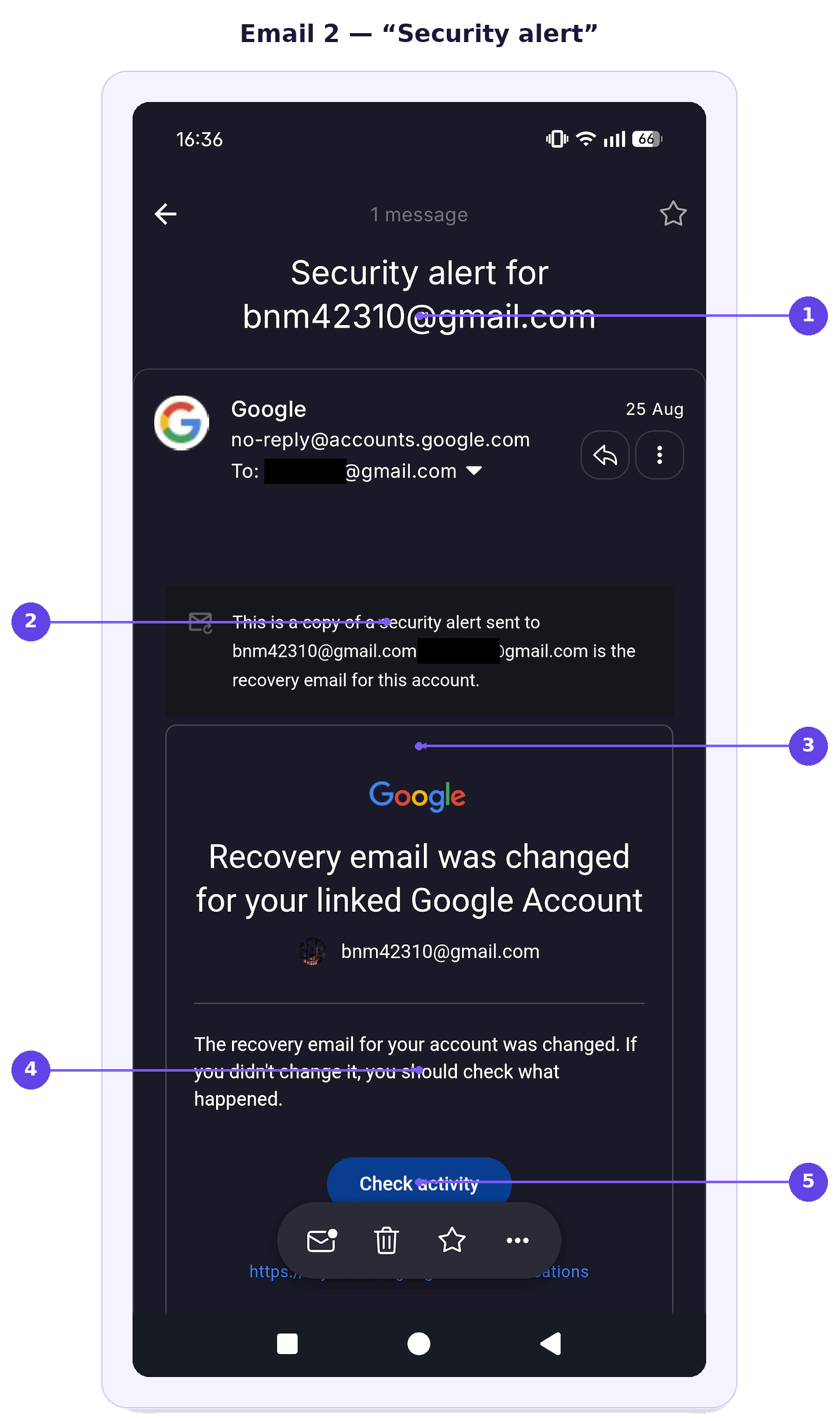
A second genuine Google message reported a recovery-email change, but its fine print showed that it was a copy of an alert sent to the attacker-controlled address. It was not evidence that the employee’s own account had been changed.
Proton says the attacker withdrew the recovery request after the call ended, removing the pending trail in this case. The emails themselves were authentic; the deception came from pairing them with an unsolicited call, urgency, and pressure around account access.
What to do when Google appears to call
Google Help says Google will never call users about their account security. If an unsolicited caller claims to be Google Security and says your account was compromised, end the call, open your Google Account or Security Checkup independently, and never provide passwords, verification codes, recovery codes, or approval for a device prompt.
If an unfamiliar account tries to add your address as its recovery email, Google says your own account remains safe and the message includes an option to remove your address. For other security alerts, review the named account, device, time, and location; if unfamiliar activity concerns your own account, use the secure-account action and follow the recovery steps.
Sources and checked date: Proton · Google Help · September 5, 2026
Leave a comment