
SNACK: 3-line summary
- Microsoft has begun rolling out Cloud rebuild in the optional KB5127936 preview for Windows 11 25H2 and 26H2.
- It downloads Windows and device drivers without USB media, provided the recovery environment works and can get online.
- Both file-removal options delete local data from the system disk; back up first, and expect feature availability to vary by device.
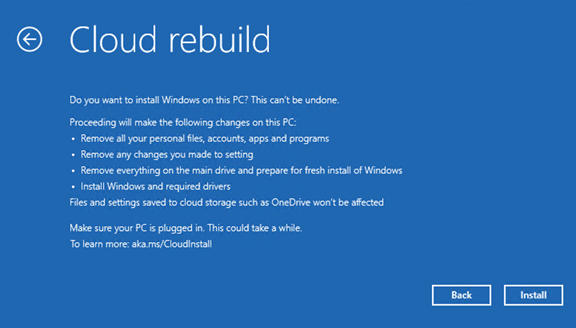
Microsoft is starting to roll out Cloud rebuild, a Windows 11 clean-reinstall option that downloads Windows and device drivers without a USB installer. It removes local files from the system disk, so back up anything you need before starting.

Snackgirls react
AIKO: I’d be curious to trace that first connection: a working network driver in recovery opens the way to downloading Windows and the rest of the drivers.
Nea: Before starting, I’d want my game captures and save files safely copied elsewhere. I’d hate to lose a screenshot of a favorite character’s small change in expression.
A fresh installation when Windows will not start
Cloud rebuild downloads a Windows image and the PC’s device drivers from Windows Update, without requiring USB installation media or a custom recovery image. It can also run when the installed copy of Windows will not boot.
That still requires a healthy Windows Recovery Environment (WinRE), a compatible networking driver supplied there by the manufacturer, internet access and a PC that meets Windows 11’s minimum hardware requirements. A damaged recovery environment or missing required drivers can leave you needing other recovery media.
The entry point in Windows is Settings > System > Recovery > Rebuild PC. If Windows cannot start, Cloud rebuild is available from WinRE’s troubleshooting menu.

Both choices remove your files
Back up anything you need before starting: both Remove files and Remove & sanitize files remove locally stored files, accounts, apps and settings from the system disk before reinstalling Windows. Remove files is the faster option, intended for continued use of the PC, but specialized recovery tools may still recover deleted data.
Remove & sanitize files also asks the storage hardware to securely erase the targeted disks. Sanitization is irreversible, but its effectiveness depends on the hardware supporting and correctly implementing the erase operation; Windows cannot independently verify the result. On PCs with multiple disks, check backups for every targeted drive before choosing Windows disk only or All disks.
Keep the PC connected to power throughout preparation, downloading, installation and any sanitization. Do not manually restart or power it off during the process, even if it appears idle while erasing data.
An optional preview, with a gradual rollout
KB5127936 is the optional non-security preview released on October 28, 2026, for Windows 11 25H2 and 26H2. It is offered under Settings > Windows Update > Advanced options > Optional updates, but features are rolling out gradually and may not appear on every device immediately after installation.
The update also adds Customize menu at the bottom of File Explorer’s right-click menu, letting you adjust commands and where app extensions appear. You can leave the default configuration unchanged.
Microsoft still lists an unresolved issue affecting some USB Audio Class 1.0 devices after the September 8, 2026, security update, including Code 10 errors, missing audio or unresponsive volume controls. This preview does not list a fix for that issue.
Sources and checked date: October 30, 2026
Comments
0No login needed. Edit or delete your comment from the same browser.
All comments 0
한국어 · English · 日本語No comments yet. Start the conversation.