
SNACK three-line summary
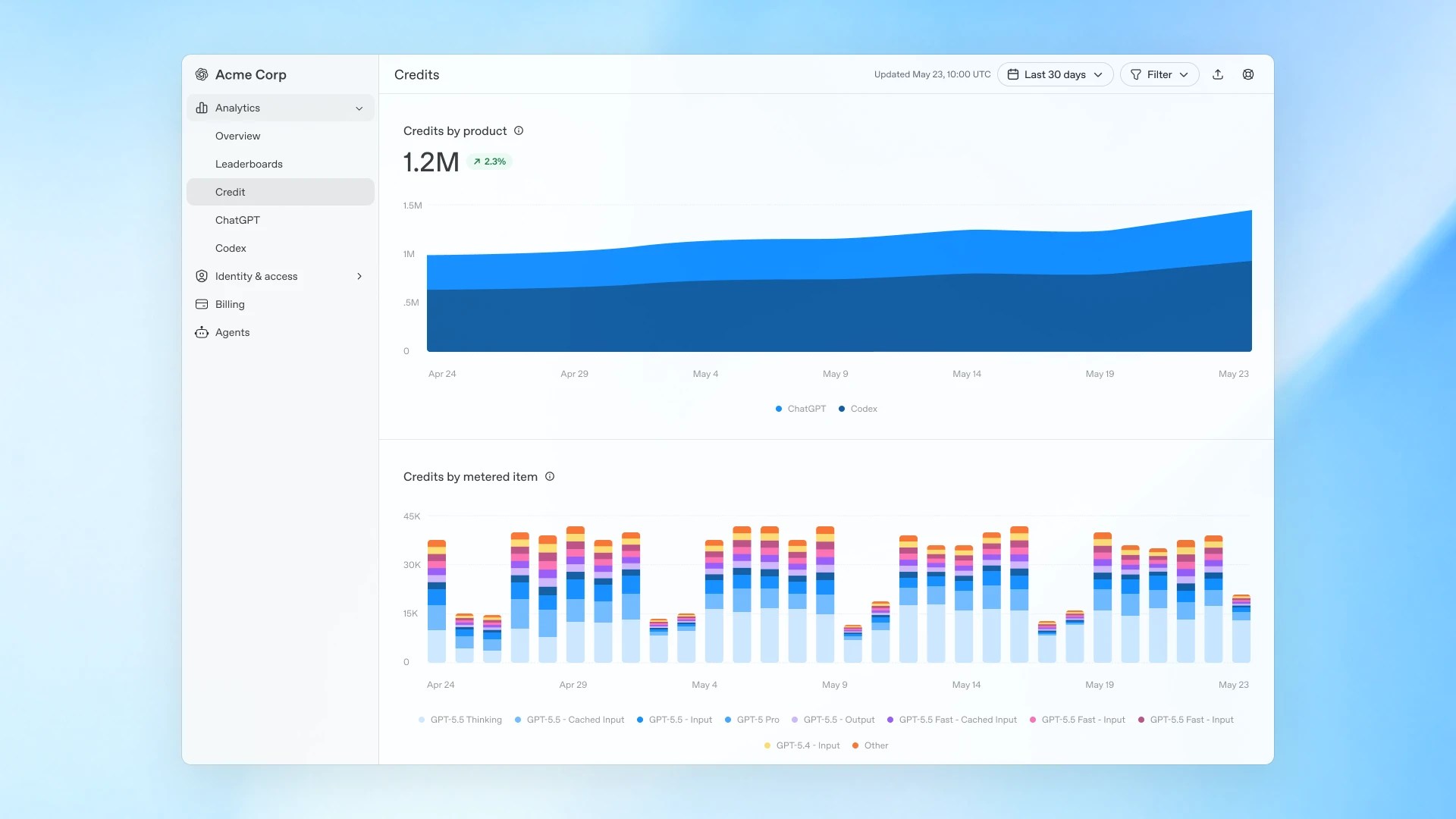
- OpenAI officially announced new usage analytics and spend controls for ChatGPT Enterprise on June 18. The first major change is that admins can now track ChatGPT and Codex credits together from the admin screen.
- Admins can also set new monthly limits by workspace, group, and individual user. That makes it easier to give heavier access to select power users while keeping the rest of the team on a default limit.
- The key point is that this is not a general ChatGPT feature add-on, but a change to enterprise operating rules. Existing weekly limit settings are scheduled to move automatically into the new monthly structure on July 15, so admins should review their setup in advance.
Snackgirls editor note
AIKO: “This is not news that the model got smarter. The main point is that companies now have a more detailed way to control AI usage internally.”
Red: “The important part is that Codex is now visible on the same screen. The real operations issue is no longer just who uses the most, but how much budget each team should be allowed to use.”
What changed
OpenAI announced on June 18 that it had added new usage analytics and spend controls to the ChatGPT Enterprise admin screen. According to the announcement, admins can now view ChatGPT and Codex credit usage in one place and break it down more precisely by user, product, and model.
Put simply, what may previously have looked like “the company seems to be using a lot of AI” can now be tracked in more concrete terms: who is spending how many credits, and in which tool.
How operations change
The practical focus of this update is monthly usage limits. According to OpenAI’s help documentation, admins can now set separate limits for the workspace-wide default, specific groups, and individual user exceptions.
That structure makes it easier to avoid applying the same cap to every employee. Instead, a company can open up more budget for coding or research teams while keeping general teams on the default setting. Users can also request limit increases directly, giving admins a clearer approval flow in the same operating view.
Why it matters
For many companies adopting generative AI, the first challenge is not performance but budget control. If admins cannot see who is using which model and when, expanding AI use can quickly turn into cost anxiety.
This announcement addresses that exact point. It means OpenAI is starting to bundle ChatGPT and Codex usage into operational metrics for administrators. Companies now need to design more carefully not just whether to adopt AI, but how much access each team should receive.
What to check first
However, this feature is not a safety mechanism that automatically turns everything on. Based on the help documentation, the new Usage limits are not set by default. Admins need to define the workspace, group, and user structure themselves.
OpenAI also states that existing weekly limit settings are scheduled to be automatically migrated to the new monthly structure on July 15. For enterprise admins, the task now is not simply to open the new screen once, but to check in advance whether the current team-by-team limit policy will still work after moving into this structure.
Sources and checked date · Published 2026-06-18 / Checked 2026-06-19T01:45:10+00:00
Sources
Comments
0No login needed. Edit or delete your comment from the same browser.
All comments 0
한국어 · English · 日本語No comments yet. Start the conversation.