
SNACK: 3-line summary
- GitLab has released critical AI Gateway security patches for CVE-2026-90970.
- Affected self-hosted gateways need updating; exploitation requires an authenticated user with Duo Agent Platform access.
- GitLab-hosted gateways already have the fix, so customers using them need no action for this issue.
GitLab has released a critical security fix for its self-hosted AI Gateway and urges operators running affected versions to update immediately. Running a self-managed GitLab server does not, by itself, mean your deployment is affected.
Snackgirls react
AIKO: I want to understand how the gateway enforces the prompt template sandbox. That’s where I’d look for the infrastructure security boundary; a chatbot’s wording wouldn’t answer that question.
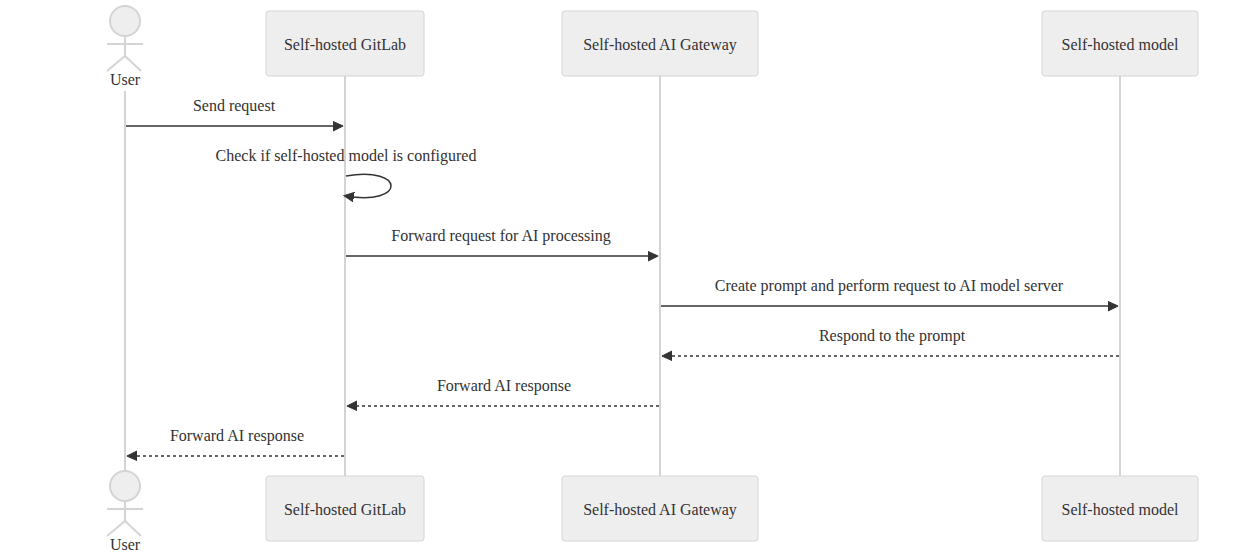
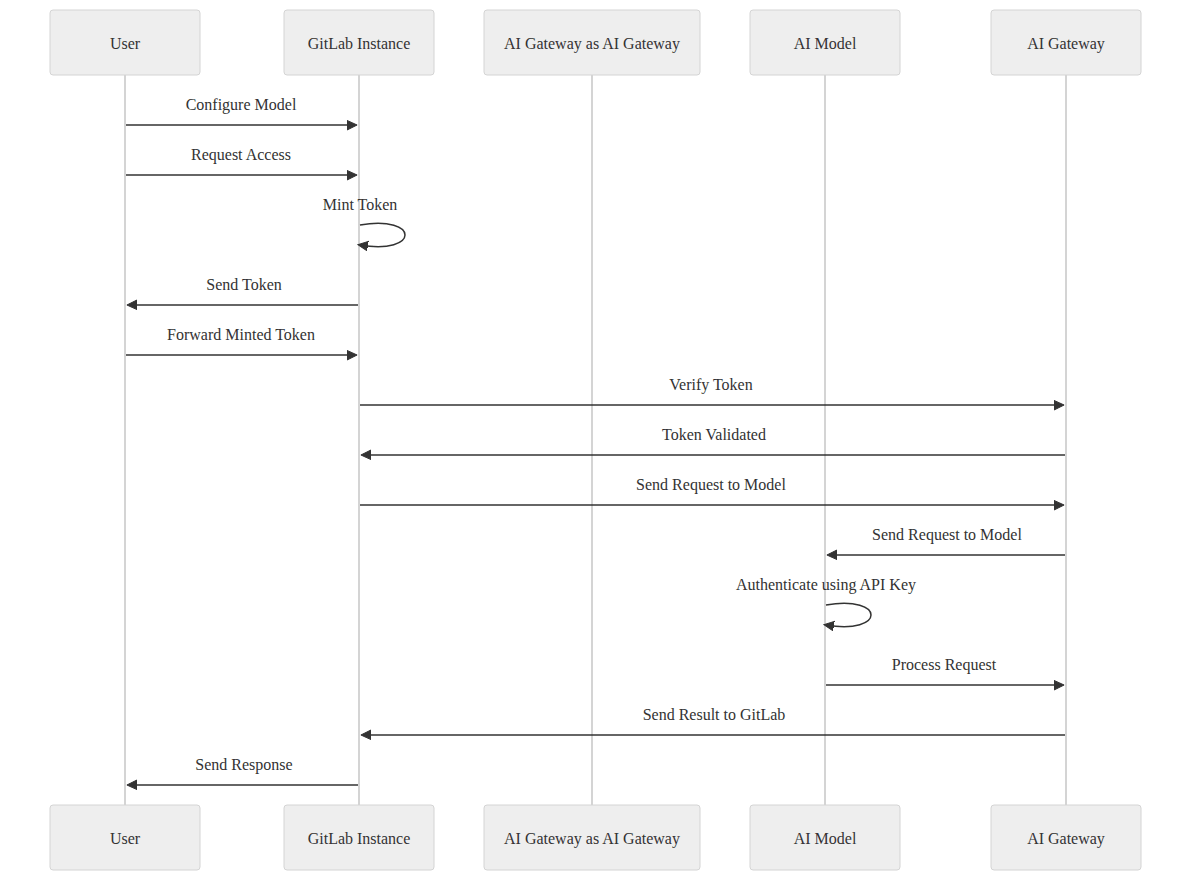
Nea: I’d like to follow a request through those configuration diagrams. I’m especially curious about the handoff from the GitLab instance to the gateway—and where my data would go next.
A self-managed server can still use a hosted gateway
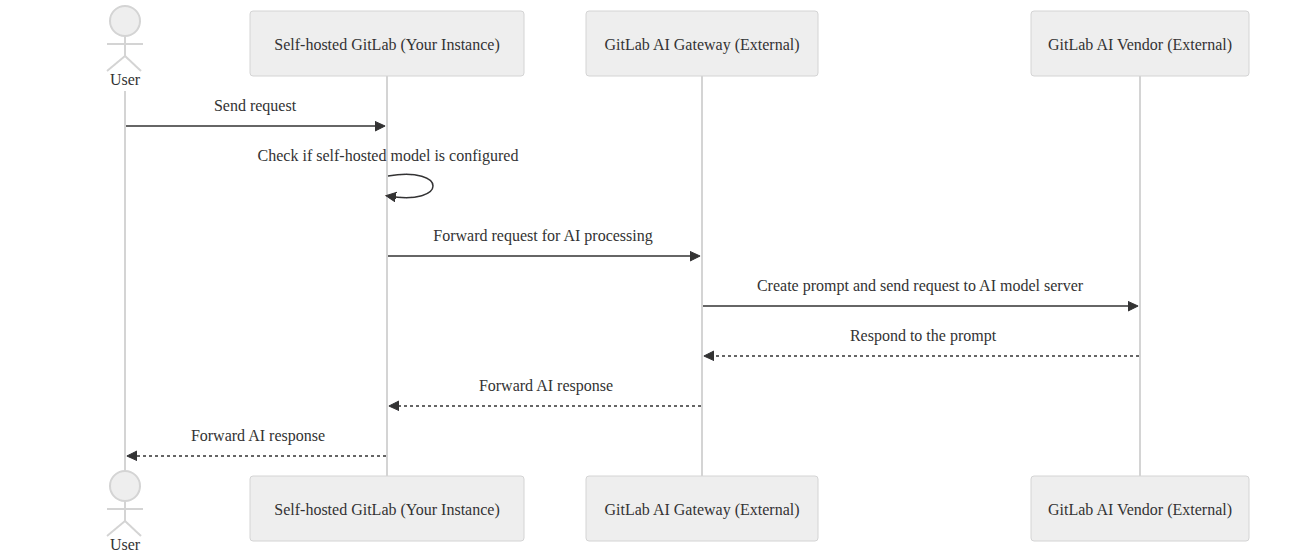
GitLab Self-Managed can use an AI Gateway operated in your own infrastructure or a GitLab-hosted gateway that processes AI requests externally. The GitLab-hosted option is the default, so the location of your GitLab server alone does not establish whether this advisory applies.
GitLab has already deployed the fix to its hosted AI Gateways. GitLab.com and GitLab Dedicated customers, along with GitLab Self-Managed customers using a GitLab-hosted AI Gateway, are protected and need no action for this issue.
The flaw could allow commands to run on the gateway
CVE-2026-90970 has a CVSS 3.1 score of 9.9. Under certain conditions, an authenticated user with Duo Agent Platform access could use a specially crafted flow configuration to escape the prompt template sandbox and execute arbitrary commands on the AI Gateway.
AI Gateway versions from 18.1.6 up to, but not including, 19.2.4 are affected, with the fix in 19.2.4. On the 19.3 branch, versions from 19.3 up to, but not including, 19.3.2 are affected, with the fix in 19.3.2. On the 19.4 branch, versions from 19.4 up to, but not including, 19.4.1 are affected, with the fix in 19.4.1.
Find the gateway, then choose a compatible update
First identify where your deployment’s AI Gateway runs, then check that component’s version. Follow GitLab’s official installation guide to choose a patched, compatible stable gateway release; its image guidance matches the GitLab major/minor release branch and calls for an explicit version tag.
For Docker deployments, the documented upgrade process is to pull the updated image and recreate the container with the required environment settings. For Helm or Kubernetes deployments using IfNotPresent, an unchanged tag can leave an older image cached; the guide explains how to use image digests or an Always pull policy to obtain updated images.
After deploying the update, use the documented health checks to confirm that the AI Gateway and Duo Agent Platform service are accessible.
Sources and checked date: October 5, 2026
Comments
0No login needed. Edit or delete your comment from the same browser.
All comments 0
한국어 · English · 日本語No comments yet. Start the conversation.