
SNACK: 3-line summary
- ONLYOFFICE Docs 10.0 is available with AI tools across its PDF, document, spreadsheet and presentation editors.
- PDFs gain hidden-information removal and automatic table recognition, while presentations can be exported as GIFs or videos.
- Cloud AI requires Wallet funding, server builds can connect local models, and open-source versions need a separate AI installation.
ONLYOFFICE released Docs 10.0 on October 10, 2026, adding AI that can answer questions about a PDF and an option to export presentations as video. The official demo introduces the new tools inside the editors.

Snackgirls react
AIKO: I like that PDF metadata cleanup has its own control. AI setup already varies by environment; not every document chore needs a model in the loop.
Nea: I’d like to try sharing a short slide deck as a video. I’m curious whether the slides can carry the explanation without a presenter.
Which AI tools you get depends on your editor and setup
A dedicated AI Tools tab gives you access to AI Chat. In PDFs, you can ask questions about the document or request a summary. Spreadsheet AI can generate and explain formulas, while presentation AI can help draft outlines and speaker notes.
The Document Editor supports tasks such as rewriting, translation and proofreading. Quick AI actions for one-off tasks and AI assistants that respond as you edit are currently available only in this editor. Saved prompts let you reuse requests in AI Chat.
Cloud users must top up their Wallet to enable the ONLYOFFICE AI service. Server builds can connect AI models, including local models. Both environments let you choose a default model and assign different models to specific tasks.
Built-in AI has been removed from the open-source versions in response to user feedback. AI tools are installed separately, so those versions should not be treated as having AI ready to use out of the box.
Remove hidden information before sharing a PDF
The PDF Editor has a built-in cleanup command in the Redact tab: Remove hidden information. It removes metadata and other hidden document information before sharing, separately from the AI tools for redacting sensitive content.
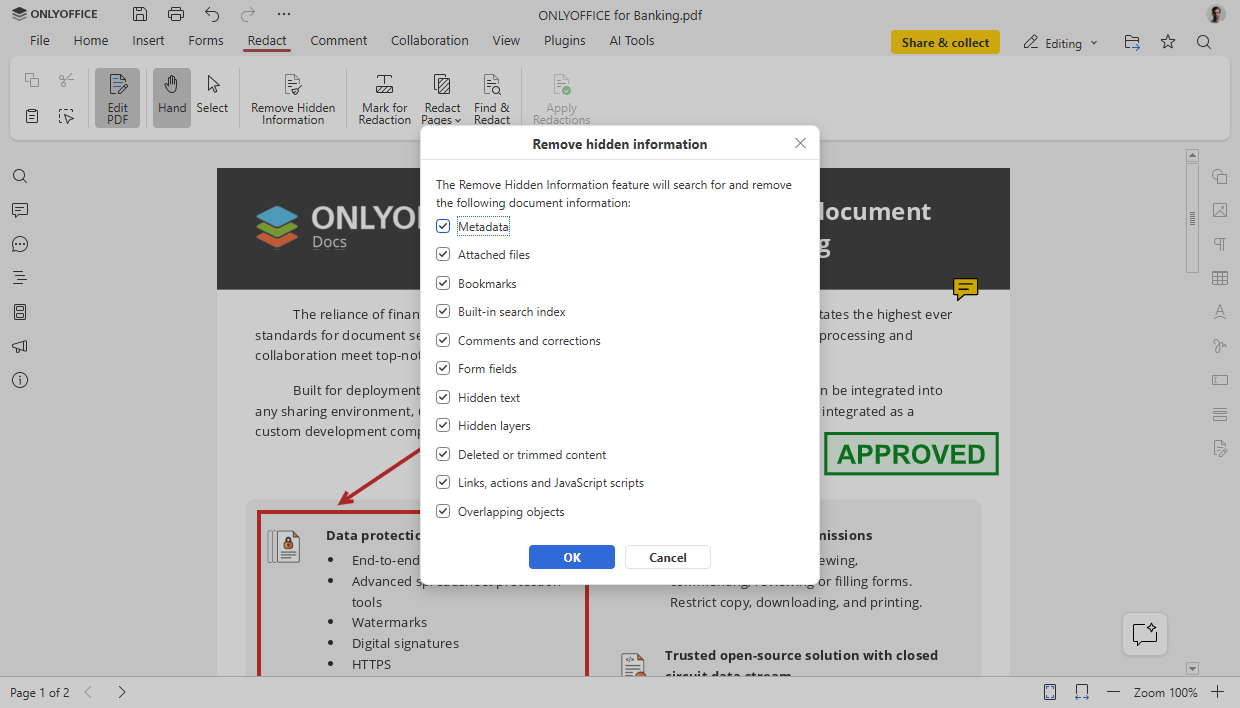
That command alone does not remove all visible sensitive content or guarantee complete anonymity. If a file contains confidential information, review what remains on the page before sending it.
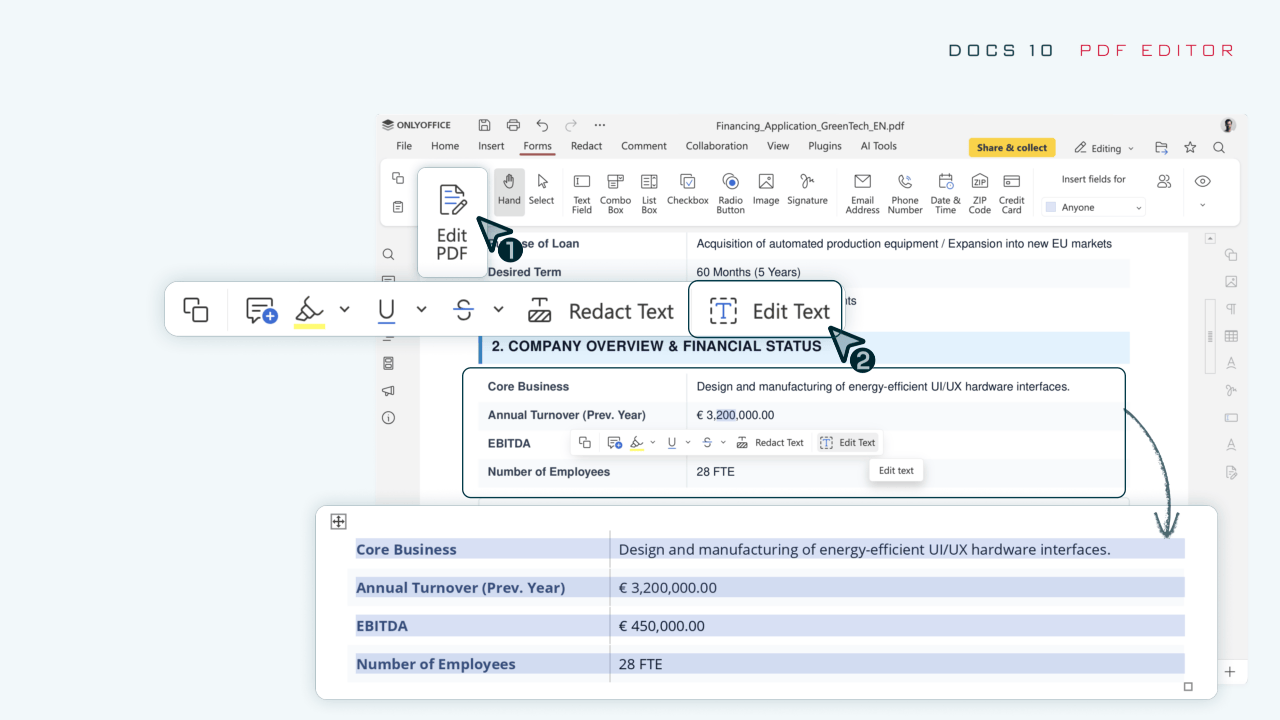
Table editing gets a separate improvement. When you use Edit Text on a PDF, automatic table recognition detects the structure, removing the need to rebuild rows and columns manually.
Share a slide deck as a GIF or video
In the Presentation Editor, open the File tab and choose Download as to export a presentation as a GIF or video. This gives you another way to share slides through email and other channels without sending the presentation file itself.

ONLYOFFICE also reports more than 1,000 bug fixes and fixes for around 35 vulnerabilities in this release. The company says it will cover the main security improvements in a separate blog post.
Before using AI with work files, check your cloud, server or open-source setup and how confidential content will be handled. Review generated text and formulas before relying on them.
Sources and checked date: October 10, 2026
Comments
0No login needed. Edit or delete your comment from the same browser.
All comments 0
한국어 · English · 日本語No comments yet. Start the conversation.