
SNACK: 3-line summary
SNACK in 3 lines
- IK Multimedia’s ARC Studio+ is shipping with room calibration available directly from the front panel.
- The supplied microphone lets you measure an existing monitor setup without a computer or separate audio interface.
- Your speakers need compatible connections; a subwoofer is optional, and passive speakers still need an amplifier.
IK Multimedia’s ARC Studio+ lets you measure your listening setup from the front panel: connect the supplied microphone to its dedicated ARC MIC input, with no computer or separate audio interface needed. The external room-correction processor supports existing stereo and 2.1 monitor systems, and audioXpress reported it was shipping on October 15.

Snackgirls react
Red I want to save separate desk and sofa Scenes, then try each from its own seat. Having those buttons right on the front makes me want to compare.
Nea I’d like to measure my listening position, then hear a familiar game soundtrack on my existing speakers. I’m curious how the different instrumental layers would come across.
What changes from the original ARC Studio
The original ARC Studio already kept correction running without a computer during playback. Measuring the room, however, required a microphone connected through an audio interface and a computer running ARC 4. Studio+ brings that step into the hardware, with standalone measurement at one or three positions.
For more detailed setup, the included ARC X software supports seven- or 21-point 3D measurement, target-curve editing and profile management. Once transferred to the processor, correction profiles remain active after the software closes.
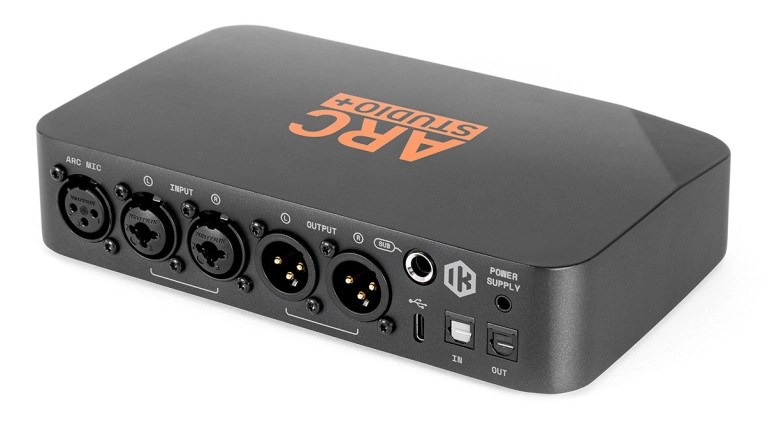
Check the connections on your speakers first
Room correction measures the response of your speakers in the room and adjusts playback accordingly. It does not remove physical reflections or provide soundproofing, and it cannot guarantee a flat response in every room.
ARC Studio+ has balanced XLR/TRS combo inputs, balanced XLR monitor outputs, a dedicated subwoofer output, USB-C digital audio input and optical S/PDIF input and output. Unlike the original model, its USB-C connection supports direct playback from a computer.
A subwoofer is optional. If one is connected to the dedicated output, IK says calibration automatically detects it and aligns its gain, crossover, phase and delay with the main speakers.
Monitors and subwoofers can come from different brands, but their physical connections must fit the signal path. Do not assume a Bluetooth-, Wi-Fi- or USB-only consumer speaker can connect directly. ARC Studio+ is not a speaker amplifier, so passive speakers still require suitable amplification; its microphone input is for calibration, not recording.
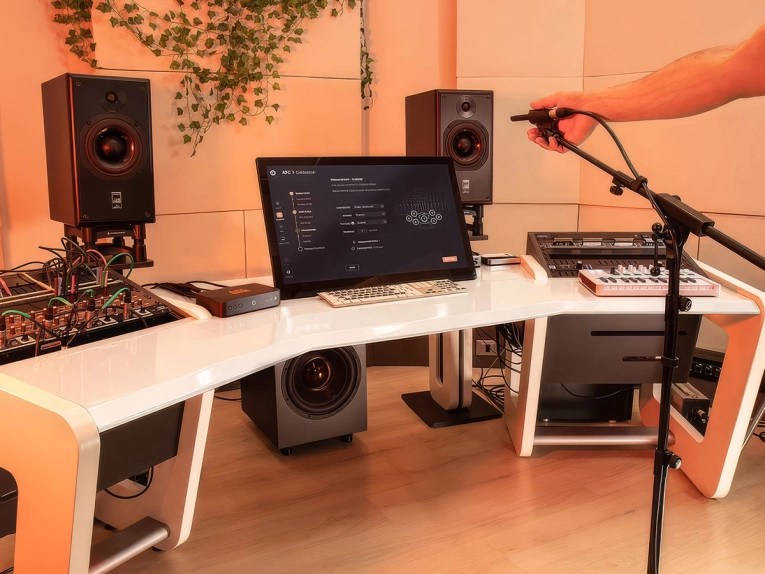
Three Scenes for different seats or sources
Three programmable front-panel Scene buttons recall complete configurations: correction profile, speaker routing, subwoofer on/off state and input selection. You could configure separate Scenes for a desk and another listening position, or for different sources, rather than returning to the software each time.
The US introductory price is $399.99, with a regular price of $449.99, both excluding tax. The package includes the processor, ARC X software, power supply and measurement microphone.
If you are building your first speaker setup, check placement and the inputs and outputs on your existing equipment before adding the processor.
Sources and checked date: 2026-10-18 (KST)
Comments
0No login needed. Edit or delete your comment from the same browser.
All comments 0
한국어 · English · 日本語No comments yet. Start the conversation.