
SNACK: 3-line summary
- Rill Browser’s Mac beta lets you send a web page and a request to Claude Code or Codex.
- It requires Apple silicon and macOS 14 or later; AI features use your existing Claude Code or Codex plan.
- AI features still send data to your provider, and passkeys do not work in the beta yet.
Launched on October 6, 2026, Rill Browser is a free Mac beta that puts the page you’re reading and your coding agent in the same window. A request can go straight from that page to a project, without switching to a separate coding app.

Snackgirls react
AIKO: I’d send it a page that fits two projects. Let the router do the agonizing over where the task belongs.
Nea: I’d like to use the history search to revisit character lore and background references. It would be lovely to find a half-remembered detail without retracing every research detour.
From the page to the right project
Press ⌘E while viewing a page, describe what you want, and Rill can pass the request and page context to your coding agent. It finds projects in your Claude Code or Codex history and routes the request to a project, so you can keep browsing while the work runs.
The free beta, made by Manifold AI Inc., requires an Apple silicon Mac running macOS 14 or later. Agent features need Claude Code 2.1.261 or later, or Codex CLI 0.144.4 or later.
Rill adds no separate subscription or API-key setup: AI features use your existing signed-in account and plan. Ordinary browsing also works without an agent; the browser brings your existing coding tools into the browsing workflow rather than replacing the underlying CLI.

Grouped tabs, with tasks still running
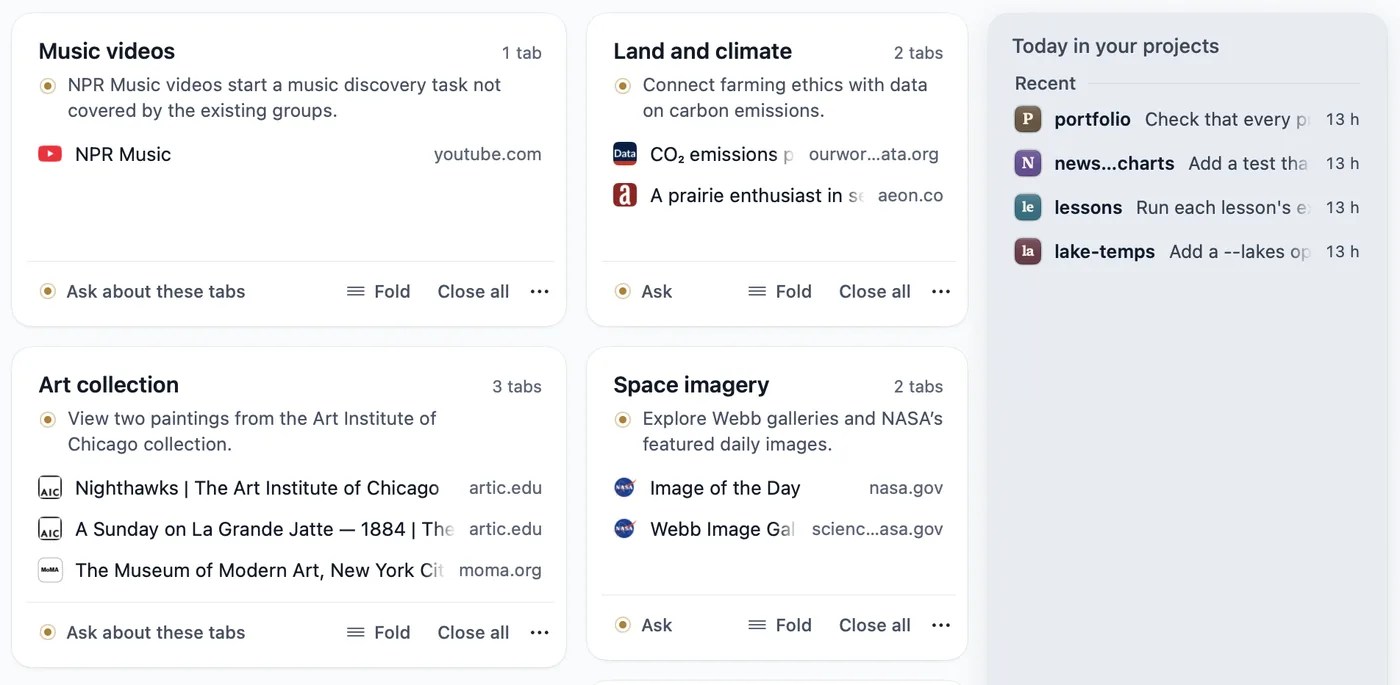
The start page groups tabs by theme, while a project overview keeps agent work in view. Rill also turns browsing history into day-by-day descriptions that you can search when you only half remember a useful page.
An official demonstration uses an open paper and a sample project named longitudinal-study, with the request “Try this method on my data.” It illustrates the handoff from reading to project work while you continue browsing in other tabs.
Local history does not mean offline AI
Rill’s privacy notice says history and agent threads stay on your Mac, with saved passwords in macOS Keychain. AI features still send data to OpenAI for Codex or Anthropic for Claude Code: tab grouping sends metadata such as titles and addresses, not page text. Asking about a page sends your question, the page’s address and title, and selected text or up to 18,000 characters of page text.
Project tasks browse in separate agent tabs without your logins, while web tasks use ordinary tabs with your sign-ins and act as you. Code tasks start read-only until you allow edits; web agents are instructed to stop before paying, ordering, sending, posting or deleting unless you clearly authorize proceeding. That instruction is not a technical lock, and Rill acknowledges that prompt-injection risk is reduced, not eliminated.
Codex tasks can read any file your account can access and send what they read to the provider, so choose pages and projects carefully. Automatic tab grouping can be disabled under Settings → Tabs → Group tabs on the start page, while turning off Save history stops new history entries and day descriptions. Passkeys do not yet work in Rill; use a password or keep Safari available for those logins.
Sources and checked date: October 12, 2026
Comments
0No login needed. Edit or delete your comment from the same browser.
All comments 0
한국어 · English · 日本語No comments yet. Start the conversation.